🔧 Item Settings
Introduction
Unlike data, the contents within settings pertain to special mechanisms processed by the plugin.
Types
fuel_time
Determines how many ticks can be burned.
fuel_time: 100

break_power
Determines the break power of this item when used as a tool. A block with required_break_power can only be effectively mined by tools whose break power is greater than or equal to the required value. (Default: inherit from the item's vanilla material)
break_power: 3
The break power of vanilla tools is hardcoded: wood/gold = 1, stone/copper = 2, iron = 3, diamond = 4, netherite = 5, other items = 0. You can override them via item.break-power in config.yml.
tags
Tags used in recipes.
tags:
  - "default:palm_logs"
  - "minecraft:logs"
  - "minecraft:logs_that_burn"
equipment
Apply the equipment to this item.

equipment:
  #
  # Required Argument
  #
  asset_id: default:topaz

  #
  # Optional Argument. Defaults to the global client_bound_model option in config.yml
  #
  client_bound_model: true

  #
  # Optional Arguments on 1.21.2 and above
  # Option 'slot' is required for these options to work
  #
  slot: head # head / chest / legs / feet / body (animal armor) / saddle
  # The resource location of the overlay texture to use when equipped. The directory this refers to is assets/<namespace>/textures/<id>.
  camera_overlay: "namespace:id"
  # Whether the item can be dispensed by using a dispenser.
  dispensable: true
  # Whether this item is damaged when the wearing entity is damaged.
  damage_on_hurt: true
  # Whether the item can be equipped into the relevant slot by right-clicking.
  swappable: true
  # >= 1.21.5
  # Whether this item can be equipped onto a target mob by pressing use on it (as long as this item can be equipped on the target at all)
  equip_on_interact: true
equipment_lod
Switches the equipment appearance for each viewer based on their distance from the equipped entity. For example, nearby viewers can see a 3D armor model while distant viewers see a simpler 2D armor texture.
items:
  your_namespace:custom_chestplate:
    material: iron_chestplate
    data:
      equippable:
        slot: chest
        asset_id: your_namespace:armor_3d
    settings:
      equipment_lod:
        asset_id: your_namespace:armor_2d
        distance: 32
attribute_modifiers
Provides CraftEngine custom attribute modifiers to the holder while the item occupies a matching slot. This system is separate from the vanilla attribute component represented by data.attribute_modifiers.
attribute_modifiers:
  # type: custom attribute ID to modify. Required
  - type: demo:might
    # id: unique modifier ID. Required; used for updates, replacement, and removal
    id: demo:item/war_blade/might
    # amount: modifier value. Required; accepts fixed numbers, ranges, expressions, and number providers
    amount: 8
    # operation: operation ID. Required
    operation: minecraft:add_value
    # scope: entity adds to the holder's stats; weapon participates only in weapon calculations. Default: entity
    scope: entity
    # slot: effective slot or slot group. Required
    slot: mainhand
    # conditions / condition: optional condition list; applies only when every condition passes
    # conditions: []
    # update_interval: check interval for dynamic values or conditions, in ticks. Default: 20
    # update_interval: 20
See Attribute → Item Attribute Modifiers for all slots, scopes, dynamic values, and the random weapon example.
equipment_potion_effects
Grants potion effects while the item is equipped in a matching slot.
equipment_potion_effects:
  - slot: head                     # Required equipment slot or slot group
    type: minecraft:strength       # Potion effect ID
    amplifier: 2                   # Strength III
    ambient: true                  # Default: false
    particles: false               # Default: true
    show_icon: true                 # Default: true
    conditions:                    # Optional
      - type: expression
        expression: "<arg:player.x> > 1000"
    update_interval: 20             # Condition check interval in ticks; default: 20
- For the same potion effect type, only the highest level applies. Any replaced external effect is restored with its remaining duration afterward.
- Built-in slots include
mainhand,offhand,head,chest,legs,feet,body, andsaddle. Custom slots can also be registered through the API, allowing accessory plugins to provide these effects. - The entity type must be enabled in
entity.trackinginconfig.yml.
equipment_set_part
Marks an item as part of an equipment set while it is equipped in one of the specified slots. Set bonuses must be defined separately under equipment_sets.
equipment_set_part:
  # slots: physical slots in which the item counts toward the set. Required
  - slots:
      - head
    # sets: set IDs to which the item belongs in this slot. Required
    sets:
      - example:potion_test
An item can belong to multiple sets. slots accepts only mainhand, offhand, head, chest, legs, feet, body, and saddle; slot groups are not accepted. Set tiers do not accumulate, and only the highest satisfied tier applies. See Attribute → Equipment Sets for the complete configuration.
repairable
Decides if the item can be repaired through crafting table/anvil/grindstone. (Default: true)
repairable: true

# Detailed repair configuration (overrides the simple boolean above)
repairable:
  crafting_table: true    # combine two of the same item in a crafting table
  anvil_repair: false     # repair with materials in an anvil
  anvil_combine: true     # combine two of the same item in an anvil
  grindstone_repair: true # combine two of the same item in a grindstone

anvil_repair_item
Determines how much durability a given item provides when repairing.
anvil_repair_item:
  - target: "#topaz_tools" # use tags
    amount: 20  # restores fixed durability
  - target:
      - "minecraft:iron_pickaxe"
      - "minecraft:shears"
    percent: 0.25  # 0.25 = 25%, restores n% total durability
drag_repair_item
Determines how much durability this item provides when dragged onto another item to repair it. Pick up this item with your cursor and drop it onto a damaged item in your inventory to repair it. Left-click repairs as much as possible (consuming as many materials as needed), while right-click consumes only one material at a time. If the target item is fully repaired or not a valid target, the vanilla swap behavior is kept.
drag_repair_item:
  - target: "#topaz_tools" # use tags
    amount: 20  # restores fixed durability
  - target:
      - "minecraft:iron_pickaxe"
      - "minecraft:shears"
    percent: 0.25  # 0.25 = 25%, restores n% total durability
    sound: minecraft:item.armor.equip_iron # optional; or use the map form below
#   sound:
#     id: minecraft:item.armor.equip_iron
#     volume: 1
#     pitch: 0.9~1
amount and percent can be combined: each material restores amount + percent × max durability points of durability.
renameable
Determines if the item can be renamed in anvil. (Default: true)
renameable: false
prevent_break
Determines whether the item is prevented from breaking when its durability runs out. (Default: false)
The item keeps its last point of durability instead of being destroyed. An item in this "broken" state can no longer be used: attacking, mining, shooting bows/crossbows and right-click usages (e.g. stripping logs, hoeing dirt, raising a shield) are all blocked until it is repaired. Worn armor is automatically unequipped when it breaks — moved into the player's inventory, or dropped on the ground if the inventory is full.
prevent_break: true
can_place
Determines whether the vanilla block corresponding to this item's material can be placed. Set it to false when you use a block-like material (e.g. note_block) as the base for a non-block item, so players can't place it as a block. (Default: false)
can_place: false
allowed_projectiles
Determines which item can be loaded into crossbows and bows
allowed_projectiles:
  - gun_world:gun_ammo
  - minecraft:ender_pearl
projectile
Creates a custom projectile entity based on the item. It supports trident, arrow, snowball and more.
projectile:
  display:
    item: default:topaz_trident # the item to display
    translation: 0,0,0
    rotation: 1,1,1,1
    display_transform: NONE
    scale: 0.5
  sounds:
    throw: minecraft:item.trident.throw
    hit_entity: minecraft:item.trident.hit
    hit_block: minecraft:item.trident.hit_ground
  # Whether to ignore the Infinity enchantment when used as ammunition
  ignore_infinity_enchantment: false
  # Whether the projectile can be picked up after hitting a target
  pickupable: true
  # Whether to remove the projectile upon impact
  remove_on_hit: false
  # Whether the projectile is affected by gravity
  gravity: true
  # Projectile velocity
  velocity: 1
  # Base damage
  damage: 10
  # The number of times this arrow can pierce through an entity
  pierce_level: 5
Any sound configuration supports advanced configuration formats
sounds:
  throw:
    id: minecraft:item.trident.throw
    pitch: 0.9~1
    volume: 1
hit_block and hit_entity support changing the sound type based on the hit target.
sounds:
  hit_block:
    default: minecraft:item.trident.hit
    overrides:
      minecraft:stone: minecraft:item.trident.hit_stone
      default:palm_log: minecraft:item.trident.hit_log
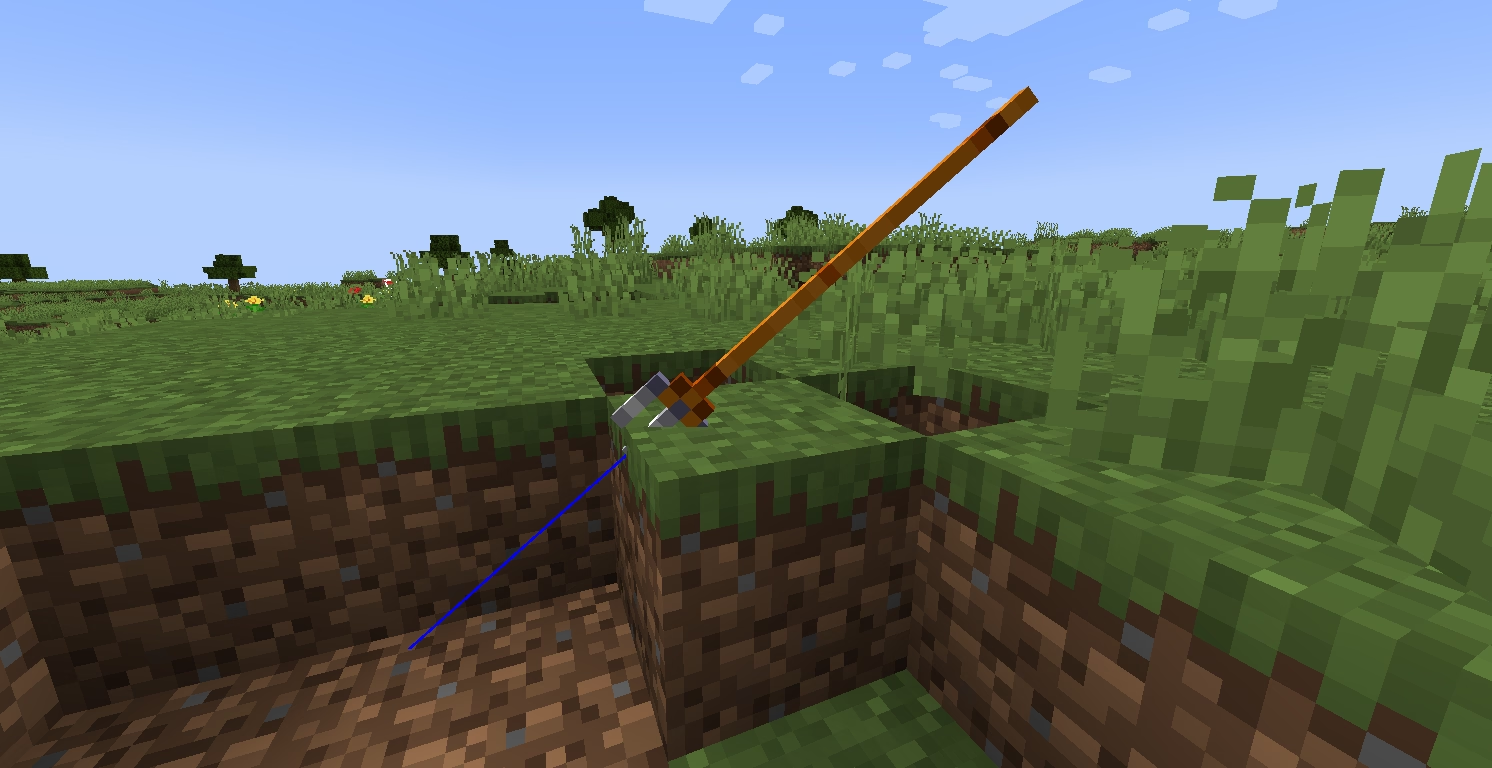
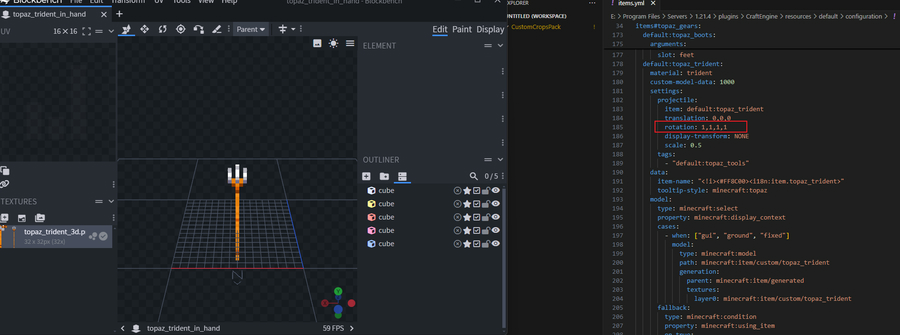
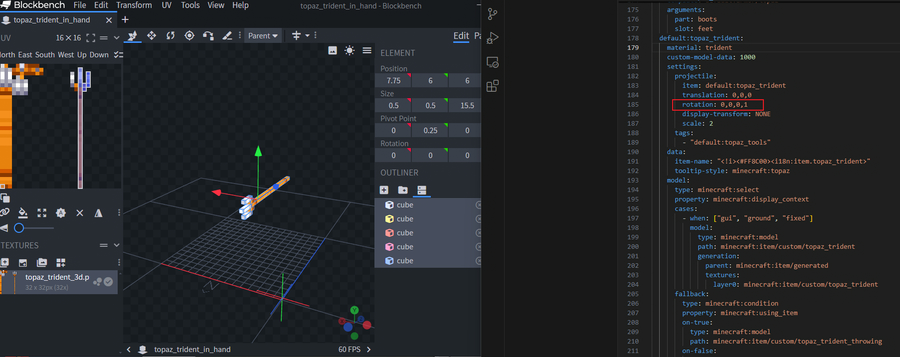
The way you model directly affects the rotation arguments in the configuration file.
No matter which modeling method you use, the most important thing is to make the sharp part of the trident in the position shown in the picture above to ensure the best hitting point.
dyeable
Decides if the item can be dyed in crafting tables. (Default: undefined)
dyeable: true

food
Plugin-based alternative implementation for the food component.
food:
  nutrition: 5  # 0~20, integer
  saturation: 3.5  # 0~10, float
Better to use food components on a 1.20.5+ server
consume_replacement
Set the return item after consuming the item. For example, after the player drinks the water bottle, the empty bottle will be returned. (Default: null)
consume_replacement: minecraft:apple
craft_remainder / craft_remaining_item
Choose whether items should return other items when the crafting recipe is finished.
Returns a fixed item
craft_remainder: bucket
craft_remainder:
  type: fixed
  item: bucket
  count: 1
Consumes a certain amount of durability
craft_remainder:
  type: hurt_and_break
  damage: 1
Select the remaining items according to the recipe
craft_remainder:
  type: recipe_based
  terms:
    - recipes:
        - test:test1
        - test:test3
      craft_remainder:
        type: hurt_and_break
    - recipes:
        - test:test2
      craft_remainder: minecraft:stone

fuel_remainder
Returned after being consumed as fuel. Only applies to items with a stack size of 1
fuel_remainder: paper
invulnerable
invulnerable:
  - lava
  - fire
  - fire_tick
  - block_explosion  # respawn anchor
  - entity_explosion  # creeper, tnt
  - lightning
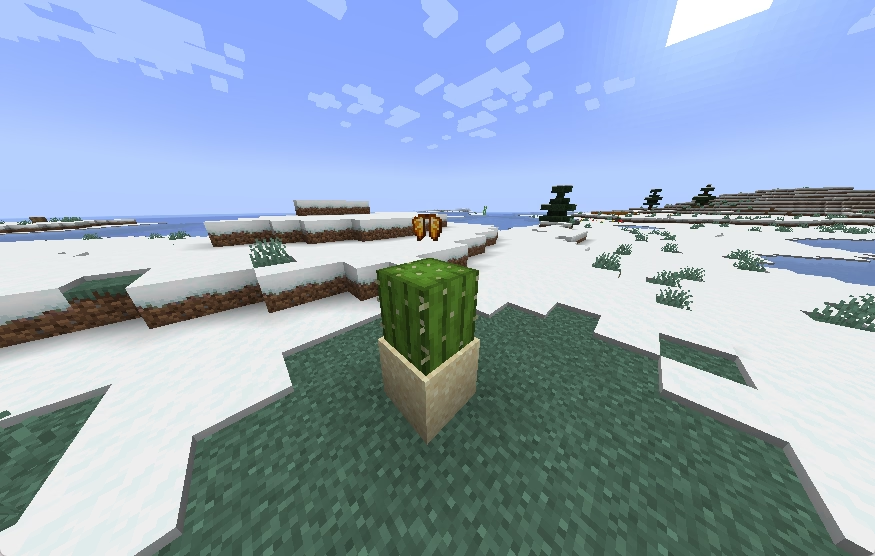
  - contact  # cactus
enchantable
This option lets you block certain items from being used on the enchantment table. Tip: setting it to true won’t magically make unenchantable items enchantable. (Default: true)
enchantable: false
compost_probability
This setting controls how likely it is for composting to succeed (Default: 0.5).
compost_probability: 0.5
respect_repairable_component
Controls whether the items listed in the repairable component can repair this item in the anvil interface. The default is false for custom items and true for vanilla items.
respect_repairable_component: false
dye_color
This determines what color it provides in the dyeing recipe.
dye_color: 255,140,0

firework_color
This determines what color it provides in the firework star fade recipe.
firework_color: 255,140,0
ingredient_substitute
This determines which vanilla items this item can serve as an equivalent substitute for within the recipe system.
ingredient_substitute:
  - minecraft:leather
  - minecraft:paper

hat_height (require CustomNameplates)
This determines the impact of hat height on nametag height
hat_height: 1.5
keep_on_death_chance
Determines the probability of keeping this item after death.
keep_on_death_chance: 0.2 # 0~1
destroy_on_death_chance
Determines the probability of this item being destroyed upon death.
destroy_on_death_chance: 0.5 # 0~1
drop_display
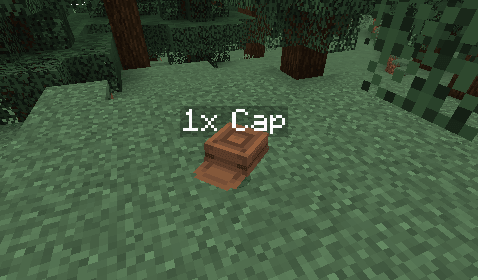
Used to control whether the names of dropped items are displayed, as well as what content is shown.
drop_display: false # If globally enabled, can be individually disabled for specific items.
drop_display: true # Displays the entity name based on the item name.
# Custom display name. <arg:count> represents the quantity, <name> represents the item name.
drop_display: "<arg:count>x <name>"
glow_color
Make items glow and display colors.
# black, dark_blue, dark_green, dark_aqua, dark_red, dark_purple, gold, gray, dark_gray, blue, green, aqua, red, light_purple, yellow, white
glow_color: white