🌍 Worldgen Feature
Introduction
Worldgen features are used to generate natural structures like trees, ores, flowers, and grass in the game.
There are two core concepts:
| Concept | What it controls | Example |
|---|---|---|
| Configured Feature | What a single feature looks like. | The shape of a tree — trunk height, leaf shape, etc. |
| Placed Feature | How that feature appears in the world. | Which biomes, how rare, how many attempts per chunk. |
Using the Datapack Generator
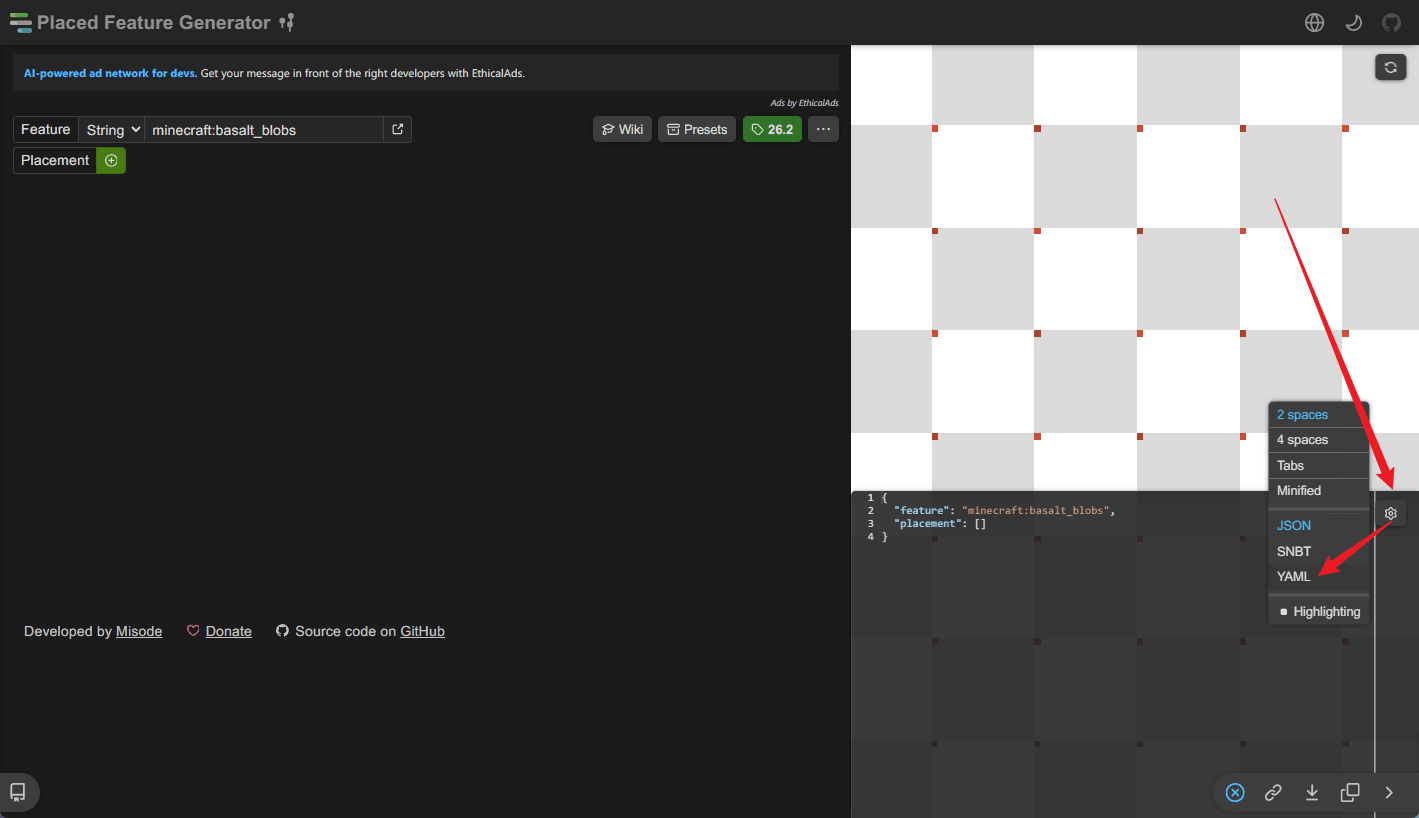
To create a CraftEngine worldgen configuration, you should use a datapack generator. Writing these configurations by hand is usually not practical — the chance of getting the syntax wrong is very high. Start by opening misode's generator, then switch the output format to YAML.
Understanding the Structure
The first thing to do after opening the generator is to set it to your server's Minecraft version. Version mismatch is one of the most common reasons why a feature does not work.
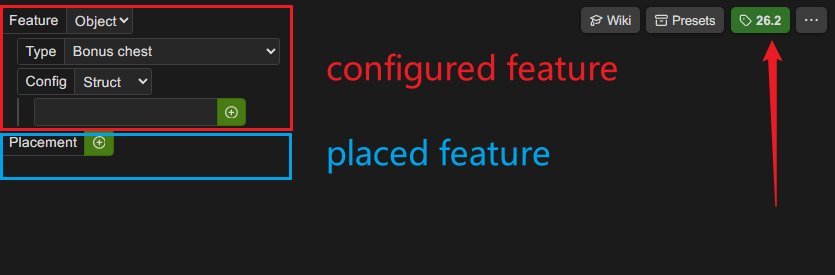
A placed feature has two root keys:
feature— the configured feature. It can be a string that references another configured feature, or an object that defines the configured feature directly.placement— the placed feature part. It controls how and where the feature is generated.
String vs. object
Use a string when you want to reuse the same configured feature in multiple placed features. For example, you might have one palm tree configured feature, but place it differently on beaches and in jungles.
placed_features:
  default:palm_tree_beach:
    feature: default:palm_tree
    placement:
      - type: 'minecraft:rarity_filter'
        chance: 7
Use an object when the configured feature is only used once, or when you do not want to maintain a separate configured feature entry.
placed_features:
  default:fairy_flower:
    feature:
      type: 'minecraft:simple_block'
      config:
        to_place:
          type: 'minecraft:simple_state_provider'
          state:
            Name: 'default:fairy_flower'
    placement:
      - type: 'minecraft:rarity_filter'
        chance: 100
You can also define configured features separately under the configured_features key, and reference them by ID from placed features.
For the configured feature itself, use misode's configured feature generator.
Configured Features
You can use CraftEngine block IDs anywhere vanilla block IDs are accepted.
Custom block support
-
In block states:
Name: 'default:palm_log'Properties:axis: 'y' -
In block predicates:
blocks: 'default:topaz_ore'Or as a list:
blocks:- 'default:ore_a'- 'minecraft:stone'
CraftEngine providers and feature types
When a custom block does not work with a vanilla provider, try the CraftEngine equivalents:
| Type | Use case |
|---|---|
craftengine:simple_block | Alternative to minecraft:simple_block for custom blocks. |
craftengine:simple_state_provider | Same layout as minecraft:simple_state_provider, but supports custom block IDs. |
craftengine:weighted_state_provider | Same layout as minecraft:weighted_state_provider, but supports custom block IDs. |
craftengine:rotated_block_provider | Same layout as minecraft:rotated_block_provider, but supports custom block IDs. |
craftengine:randomized_int_state_provider | Same layout as minecraft:randomized_int_state_provider, but supports custom block IDs. |
Example
configured_feature:
default:palm_tree:
type: 'minecraft:tree'
config:
trunk_provider:
type: 'craftengine:simple_state_provider'
state:
Name: 'default:palm_log'
Properties:
  axis: 'y'
Placed Features
These top-level fields restrict where the feature can generate:
| Field | Accepted values | Effect |
|---|---|---|
| world | List of exact world names | Only generate in the listed worlds. |
| dimension | List of dimension registry keys, e.g. minecraft:overworld | Only generate in the listed dimensions. |
| dimension_type | List of dimension-type registry keys, e.g. minecraft:overworld, minecraft:the_end | Only generate in the listed dimension types. |
| biome | List of biome registry keys, e.g. minecraft:beach | Only generate in the listed biomes. Requires the minecraft:biome placement modifier in placement. |
Example
placed_features:
  default:palm_tree:
    biome:
      - minecraft:beach
    dimension_type:
      - minecraft:overworld
    feature: default:palm_tree
    placement:
      - type: 'minecraft:rarity_filter'
        chance: 7
      - type: 'minecraft:heightmap'
        heightmap: WORLD_SURFACE
      - type: 'minecraft:biome'
Practical Guide: Ore Generation
This section shows how to configure an ore feature from start to finish. The example below puts the configured feature directly inside the placed feature, which is the most common way to write it.
Example
placed_features:
  default:topaz_ore:
    dimension_type:
      - 'minecraft:overworld'
    feature:
      type: 'minecraft:ore'
      config:
        discard_chance_on_air_exposure: 0.0
        size: 10
        targets:
          - state:
              Name: 'default:topaz_ore'
            target:
              predicate_type: 'minecraft:tag_match'
              tag: 'minecraft:stone_ore_replaceables'
          - state:
              Name: 'default:deepslate_topaz_ore'
            target:
              predicate_type: 'minecraft:tag_match'
              tag: 'minecraft:deepslate_ore_replaceables'
    placement:
      - type: 'minecraft:count'
        count: 4
      - type: 'minecraft:in_square'
      - type: 'minecraft:height_range'
        height:
          type: 'minecraft:uniform'
          min_inclusive:
            absolute: -32
          max_inclusive:
            absolute: 112